
Anyone who deals with visibility in ChatGPT, Gemini, Perplexity, Claude, and similar AI language models will inevitably stumble across the term llms.txt. This file is intended to WordPress website make more readable for “AI search engines” and thereby increase visibility. That’s the theory.
But what impact does this file have? What is the real purpose behind it? In this article, I will clarify these questions and the following points:
- What is llms.txt?
- The best WordPress plugins for llms.txt
- The difference between llms.txt, robots.txt, and sitemap.xml
- llms.txt vs. llms-full.txt
- How can the success of llms.txt be measured?
- How useful is llms.txt really?
What is llms.txt: The purpose of the file simply explained
llms.txt is a Proposal for a file under /llms.txt, which is located in the root directory of a website and is structured in Markdown format. The idea behind it is simple: instead of sending a language model through all the pages with navigation, PHP, JavaScript, and CSS, a compact overview with the most important content is provided.
Or in other words: The file is a guide that shows LLMs the most important content and context of a website.
The specification provides for an H1, a short description, optional detail sections, and thereafter zero or more H2 sections with link lists. Using Eberle Consulting as an example, this would look simplified as follows:
# Eberle Consulting
Eberle Consulting supports companies with web design, WordPress, SEO, GEO, and content with a focus on visibility, structure, and inquiries.
## Core Services
– [Home](https://consulting-eberle.de/): Overview of services, references, team, and frequently asked questions
## Content & Resources
– [Blog](https://consulting-eberle.de/blog/): Expert articles and references on SEO, WordPress, and digital visibility
Taking WPspace as an example, this could look like this:
# WPspace
WPspace offers managed WordPress hosting from Germany with a focus on performance, support, security, and easy management.
WordPress Hosting, WooCommerce Hosting, WordPress maintenance and help resources for businesses, agencies, and website operators.
## Products
– [Home](https://wp-space.de/): Overview of hosting offerings, benefits, features, and support
– [Managed WordPress Hosting](https://wp-space.de/managed-wordpress-hosting/): Hosting for WordPress websites with a focus on performance, security, and expert support
– [WooCommerce Hosting](https://wp-space.de/woocommerce-hosting/): Hosting for online stores with WooCommerce focusing on stable and fast loading times
– [WordPress Maintenance](https://wp-space.de/wordpress-wartung/): Maintenance and technical support for WordPress websites
## Resources
– [Blog](https://wp-space.de/blog/): Articles, tutorials, and guides all about WordPress
– [Help Center](https://help.wpspace.de/de/): Help articles and support documentation for WPspace customers
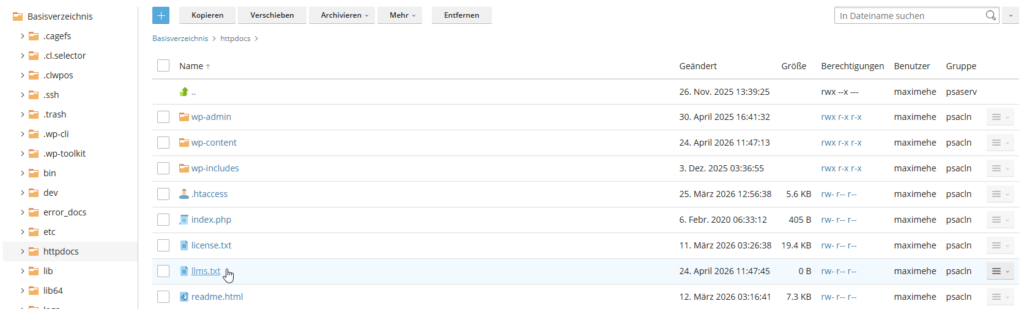
You can manually [upload/add] this text file to your WordPress host upload to your root directory or via WordPress plugin Add with just one click.
The best WordPress plugins for llms.txt
If you are already using an SEO plugin, in most cases you don't need an additional plugin. The three biggest WordPress SEO plugins now support llms.txt directly. This is practical because you don't have to install and maintain another extension.
Rank Math SEO
Rank Math supports llms.txt directly in the plugin, even without the Pro version. What is particularly useful is that you can choose which post types and taxonomies should be included. According to the documentation, content with noindex is excluded.
Rank Math points out that llms.txt currently just a proposal and not an official standard is.
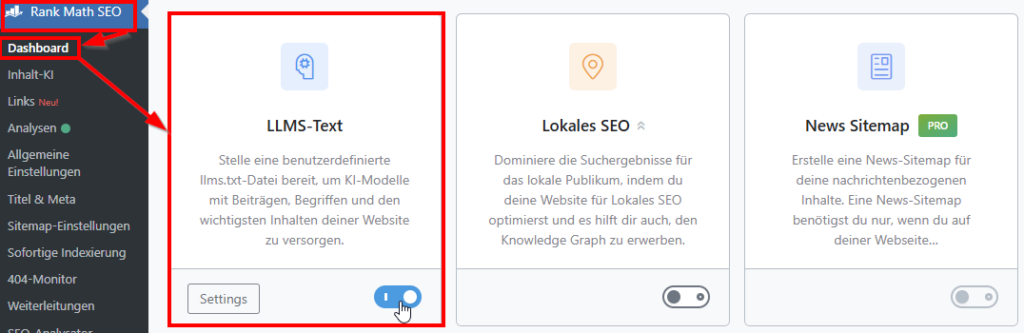
To activate llms.txt, simply toggle the switch directly in the Rank Math interface under „Dashboard“ and navigate to the settings to create your llms.txt file.
Yoast SEO
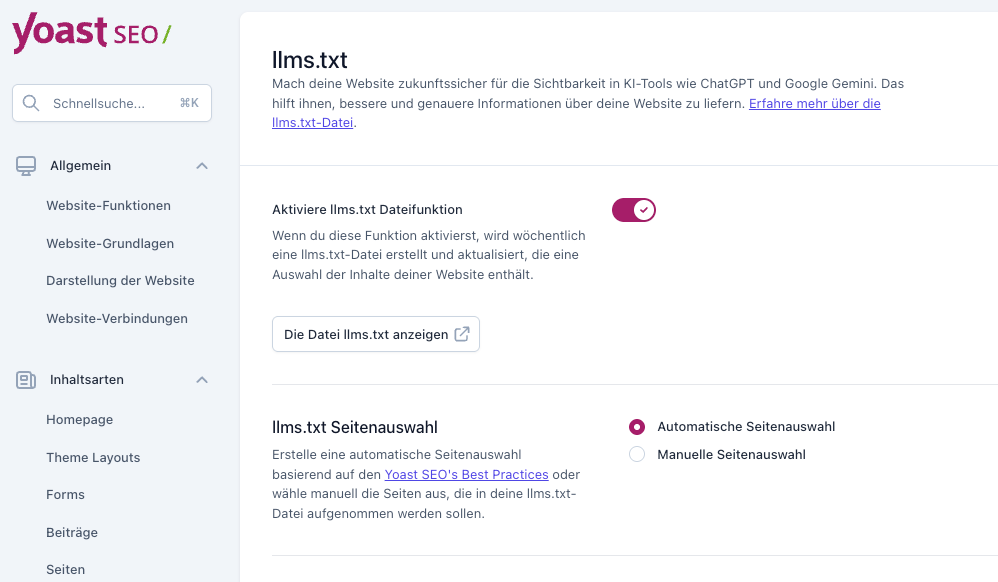
Also Yoast has integrated its own llms.txt function. You can activate it directly in the settings and then customize it. For many WordPress users, this is the easiest way because no additional plugin is required.
All in One SEO
All in One SEO also offers an integrated function. According to its own documentation, it is enabled by default and can be managed within the sitemap settings. You can also include and exclude content. If you are already using AI SEO, you should therefore first check whether the feature is already active.
The difference between llms.txt, robots.txt, and sitemap.xml
By now there are quite a few .txt files for WordPress: llms.txt, robots.txt, and then there is also sitemap.xml. But what is the difference?
robots.txt primarily regulates what crawlers are allowed to fetch or not. A detailed article on robots.txt can be found here under WordPress robots.txt: Proper usage and optimization.
sitemap.xml lists indexable pages in a structured manner.
llms.txt pursues a different goal: the provision of important content including context for AIs like ChatGPT or Anthropic's Claude.
For you as a WordPress user, this difference is important because all files cover a different function. And the llms.txt is not yet a mandatory file.
Google itself explicitly states for AI features in search that existing SEO best practices continue to apply, that no additional technical requirements exist and that you no new machine-readable files, AI text files, or markups you must create in order to be considered in AI Overviews or in AI mode.
llms.txt vs. llms-full.txt: What is the difference now?
The llms.txt That is practically the core idea. It is a compact variant. The llms.txt contains titles, important links, and a brief description. So, the file is more of a signpost than a full-text export of your entire website.
The llms-full.txt includes significantly more content. Large parts or even the entire website (cleaned up, of course) are prepared for artificial intelligence in the llms-full.txt file.
This can be useful for documentation, knowledge bases, or highly structured content hubs, but for many classic corporate websites it quickly becomes too extensive and maintenance-heavy.
In short: llms.txt is the table of contents for ChatGPT, Claude & Co., and llms-full.txt is the comprehensive manual and reference guide.
What is also important at this point: Around llms.txt, there are now several similar terms. These include, for example, llms-full.txt, llms-ctx.txt or llms-ctx-full.txt. For WordPress users, it is primarily crucial that llms.txt describes the actual basic idea.
Everything else is more of an extension or additional variant that is not yet used uniformly at present. Exactly that is also how you can tell: the topic is still under development and is not yet an established standard.
How can I measure the success of llms.txt?
If you want to go to the trouble, you should create a clear measurement concept beforehand. You can consider the following points to check the success of your AI discoverability:
- Server logs: Are /llms.txt files actually being requested by (relevant) bots?
- Referral Traffic: With tracking tools, you can check whether more traffic is coming from ChatGPT, Claude, or other AIs. Some LLMs use identifiers like utm_source, such as ChatGPT for example. You can track this.
- AI Mentions: You can track how often you are mentioned by AI systems. There are now several tools for this, but they cost a lot. Microsoft provides a free tool for this in the Bing Webmaster Tools under AI Performance. This affects your content in Microsoft Copilot and in AI-generated Bing summaries.
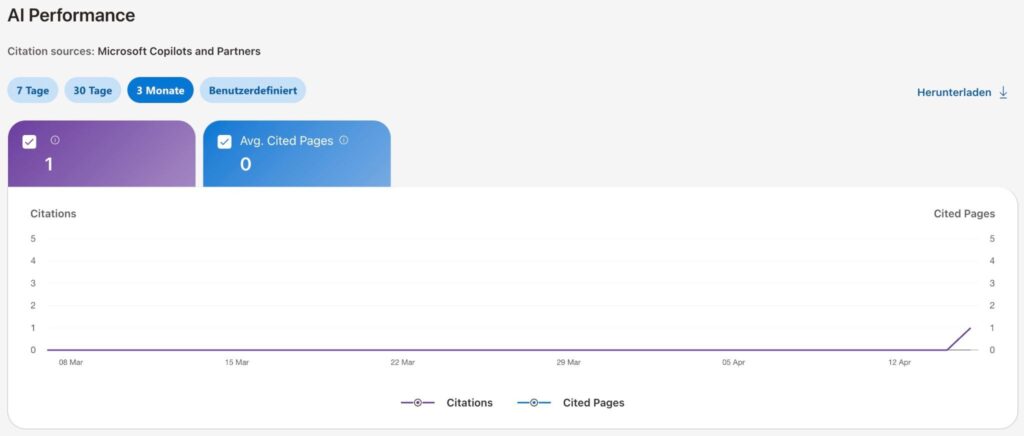
I developed a small self-experiment for this. What impact does an llms.txt file have on discoverability? These were the prerequisites:
- It was a completely new domain.
- Content was created around a topic.
- The website went live in mid-March. The llms.txt file was created with the content.
- Am 18. März wurden die Inhalte indexiert, dadurch gab es eine Aufruf-Spitze. Diese flachte logischerweise wieder schnell ab.
Und das war das traurige Ergebnis:
Eine sofortige “KI-Auffindbarkeit” konnte ich bei dem Experiment nicht feststellen. Die erste KI-Erwähnung folgte erst im April. Die Brand-Erwähnungen von ahrefs bestätigen das Bild mit nur zwei Erwähnungen von Perplexity.
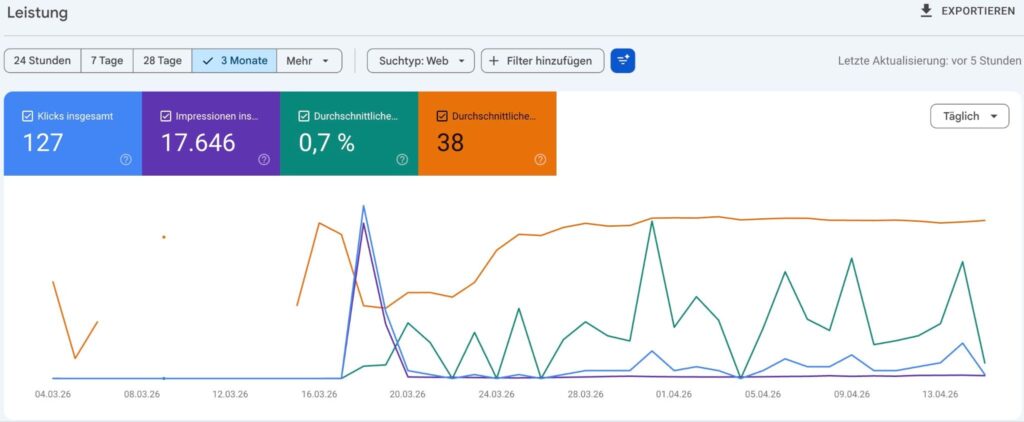
Das Bild zeigt die Entwicklung in der Google Search Console zum Selbstexperiment mit neuer Domain. Es wurden einmalig Inhalte erstellt und diese wurden indexiert. Das Bild zeigt den Verlauf der Domain.
The uncomfortable truth: For many WordPress sites, llms.txt is not a must-have right now
Mein Experiment und die aktuelle Datenlage zu der Datei sieht leider düster aus. Andere Unternehmen sind noch deutlich tiefer in die Analyse gegangen.
SE Ranking kommt zu dem Ergebnis, dass von den 300.000 untersuchten Domains nur 10,13 Prozent überhaupt eine llms.txt hatten. Noch wichtiger: Es konnte kein messbarer Zusammenhang zwischen einer vorhandenen llms.txt und der Zahl der AI-Erwähnungen festgestellt werden.
Sistrix bezeichnet die Idee als nachvollziehbar, sieht aber aktuell keine nennenswerte praktische Auswirkung auf die Sichtbarkeit. Zudem wird der richtige Vergleich gezogen, dass der Aufwand besser in bewährte Maßnahmen wie Content investiert werden sollte.
llms.txt for WordPress can still be useful
In folgenden Szenarien kann die Datei sinnvoll eingesetzt werden:
- Bei WordPress-Webseiten mit vielen URL-Typen: Standardmäßig werden bei WordPress einige URL-Typen erstellt, z.B. Kategorien, Schlagwörter, Autoren, usw. Durch die bewusste und manuelle Auswahl der wichtigsten Inhalte definierst Du für KI – aber auch für Dich selbst – die wichtigsten Inhalte, für die Du sichtbar sein willst. Das kann wiederum Deinem Marketing indirekt helfen, indem Du Dich auf Deine wichtigsten Inhalte besinnst.
- Umstritten, aber erwähnenswert: Bei Webseiten mit “Hub-Content”. Wer eine FAQ/Glossar-artige Struktur oder Ratgeber-Struktur auf seiner Seite veröffentlicht, kann passende Themen als Content-Hub bündeln und so seine Autorität pro Thema aufzeigen. Dem steht aus meiner Sicht gegenüber, dass die manuelle Pflege sehr aufwendig sein kann.
Conclusion: llms.txt is currently more of a test than a must-have
llms.txt ist ein spannender Ansatz, um Inhalte für Sprachmodelle aufbereitet bereitzustellen. Gerade in WordPress lässt sich die Datei heute mit wenig Aufwand umsetzen, vor allem dann, wenn Du ohnehin schon ein SEO-Plugin wie Rank Math, Yoast oder AIO SEO nutzt.
Trotzdem sollte man realistisch bleiben. Die bisherige Datenlage zeigt nicht, dass eine llms.txt automatisch für mehr Sichtbarkeit in ChatGPT, Perplexity oder anderen KI-Systemen sorgt. Für die meisten WordPress-Websites ist sie deshalb aktuell keine Pflicht.
Sinnvoll kann llms.txt vor allem dann sein, wenn Du viele Inhalte hast, Deine wichtigsten Seiten bewusst ausspielen möchtest oder selbst mit KI-Sichtbarkeit experimentierst. Wenn Du jedoch nur begrenzt Zeit hast, solltest Du zuerst in bewährte Grundlagen investieren: hochwertige Inhalte, saubere technische SEO, klare Seitenstrukturen und eine gute interne Verlinkung.
Mein Fazit lautet deshalb: llms.txt kann man in WordPress testen, man muss es aktuell aber nicht.
Frequently asked questions about llms.txt
Wie rufe ich die llms.txt Datei in WordPress auf?
Die llms.txt findest Du in Deinem Stammverzeichnis (root-Verzeichnis). Die Datei kannst Du unter DEINEDOMAIN.de/llms.txt abrufen.
Sollte man die llms.txt auf noindex setzen?
Es kann sinnvoll sein, eine llms.txt oder llms-full.txt per noindex von der Indexierung auszuschließen. Der Hauptgrund ist dabei weniger SEO als die Nutzerführung: So verhinderst Du, dass Besucher über Google oder andere Suchmaschinen direkt auf einer Textdatei statt auf einer normalen Website-Seite landen.
Sollte ich die llms.txt manuell erstellen oder automatisch generieren lassen?
Grundsätzlich empfehle ich, die Datei manuell zu erstellen, um die wichtigsten Inhalte auf der eigenen Website sauber darzustellen. Das gilt jedoch nur für statische Webseiten. Sobald eine WordPress-Website wöchentlich Inhalte erstellt, können sich die Prioritäten ändern und diese jedes Mal anzupassen, ist unnötige Arbeit. Deshalb mein Fazit: Wenige Inhalte manuell, viele Inhalte lieber automatisch.


 Deutsch
  English